CNC Machine Simulation, Verification Software CNC post-processors, CNC simulation software, cnc verification, G- code simulation verification
ICAM Technologies- CNC Simulation, advanced NC post-processing, cnc post-processor, CAM-POST, Post-processor, Virtual Machine, nc post-processing, Control Emulator, CNC postprocessors
ICAM Technologies- advanced NC post-processing, machine tool simulation, cnc post-processor, CAM-POST, post-processor, Virtual Machine, nc post-processing, Control Emulator, cnc postprocessor NC post-processor, advanced cnc Post- processors, CAM-POST, NC post-processor development, ICAM, cnc post-processor, Virtual Machine, postprocessing, machine toll simulation, Control Emulator Technical Tips from ICAM, Post processing Tutorial, CNC Tutorial, Machine Simulation, Postprocessor, G-code simulation, advanced CNC Post- processors for Mastercam Catia, NX, Creo, Mazak, DMG, Makino, HAAS, Siemens CNC Simulation, Custom Multi-axis CNC Post-processors and integrated  G-code simulation verification from ICAM
Technical Tips from ICAM, Post processing Tutorial, CNC Tutorial, Machine Simulation, Postprocessor, G-code simulation, advanced CNC Post- processors for Mastercam Catia, NX, Creo, Mazak, DMG, Makino, HAAS, Siemens
ICAM Home
Software Connecting CAD/CAM to CNC Machines
Post processors, CNC machine simulation for 5 axis machines, advanced CNC G-code simulation verification, collision detection for Mastercam, Catia, NX, Creo, Topsolid users
NC post-processor, advanced cnc Post- processors, CAM-POST, NC post-processor development, ICAM, cnc post-processor, Virtual Machine, postprocessing, machine toll simulation, Control Emulator
CNC Simulation, NC post-processor for Mastercam, advanced cnc Post- processors, CAM-POST, NC post-processor development, ICAM, cnc post-processor, Virtual Machine, postprocessing, machine simulation, Control Emulator NC post-processor, advanced cnc Post- processors, CAM-POST, NC post-processor development, ICAM, cnc post-processor, Virtual Machine, postprocessing, machine toll simulation, Control Emulator ICAM develops Custom Multi-axis NC post-processors, integrated CNC Simulation, G-code Simulation verification solutions supporting lathe, mill, advanced mill, rotary mill , mill-turns CNC Simulation, NC post-processor for Mastercam, advanced cnc Post- processors, CAM-POST, NC post-processor development, ICAM, cnc post-processor, Virtual Machine, postprocessing, machine simulation, Control Emulator NC post-processor, advanced cnc Post- processors, CAM-POST, NC post-processor development, ICAM, cnc post-processor, Virtual Machine, postprocessing, machine toll simulation, Control Emulator CNC Simulation, NC post-processor for Mastercam, advanced cnc Post- processors, CAM-POST, NC post-processor development, ICAM, cnc post-processor, Virtual Machine, postprocessing, machine simulation, Control Emulator NC post-processor, advanced cnc Post- processors, CAM-POST, NC post-processor development, ICAM, cnc post-processor, Virtual Machine, postprocessing, machine toll simulation, Control Emulator CNC Simulation, NC post-processor for Mastercam, advanced cnc Post- processors, CAM-POST, NC post-processor development, ICAM, cnc post-processor, Virtual Machine, postprocessing, machine simulation, Control Emulator

CNC Simulation, NC postprocessors from ICAM

How to define custom MAJOR and MINOR words in CAM-POST

There are certain situations when the cutter location data produced by a CAM system includes statements that are not recognized by the post-processor.  These custom CL commands (or post-processor instructions) are either inserted “manually” by the programmer, or generated by a customized template (such as a PPTable, in the case of CATIA).

In order to set the post-processor to execute non-standard commands, two steps are required:  First, the post must take into account all the non-standard words, so it can read the CL file without generating unknown syntax errors.  Second, the post must capture each custom command with a User-Defined Syntax macro and generate the expected output.

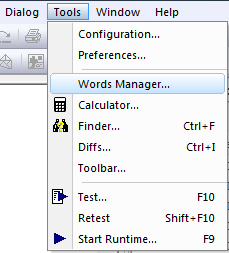
The “Tools” pull-down menu on the top menu bar of CAM-POST’s Questionnaire provides a “Words Manager” option.  Use this option to access the words customization dialog.
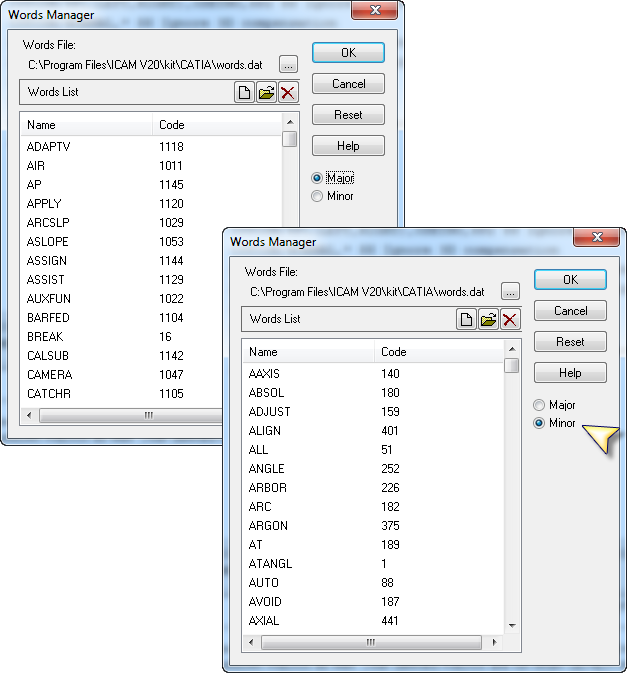
The Words Manager dialog lists all the MAJOR and MINOR words supported by the post.  Two radio buttons allow you to switch between Major and Minor words.
To add new words, click the “New” icon and enter the word along with the unique numeric code associated with it.  In order to avoid conflicts with existing words, use codes 1901 through 1999 for major words, and codes 900 through 999 for minor words.  In the example below, the major word VACUUM was added using the code 1901.  When done, VACUUM will appear on the list of available major words.
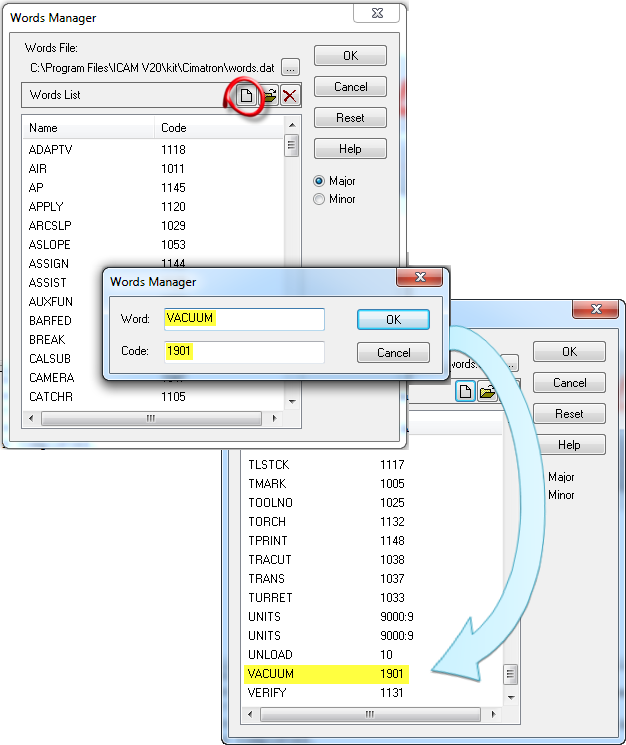
Upon exiting the Words Manager dialog (by pressing OK), all new words are written to the “words.dat” file in the CAM system interface kit. 

Next, write a User-Defined Syntax macro on the word VACUUM to define the output required for two non-standard commands: VACUUM/ON should generate a M144, and VACUUM/OFF should generate a M145.
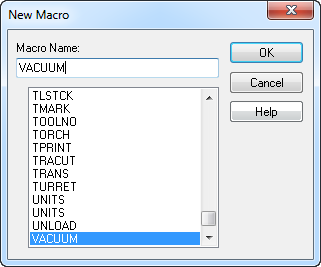
Here is the User-Defined Syntax macro:

    VACUUM/$P1(ON,OFF)
    AUXFUN/$FIF($P1.EQ.ON,144,145)

Benefit to User

Accommodate non-standard MAJOR and MINOR words produced by the CAM system.

For more information or comments, please do not hesitate to contact Phil at TechTipTuesday@icam.com


CNC simulation and verification software, NC post-processing, CAM-POST, cnc post-processors, Virtual Machine, post-processor, Control Emulator, Advanced post-processor, dedicated custom post processor