CNC Machine Simulation, Verification Software CNC post-processors, CNC simulation software, cnc verification, G- code simulation verification
ICAM Technologies- CNC Simulation, advanced NC post-processing, cnc post-processor, CAM-POST, Post-processor, Virtual Machine, nc post-processing, Control Emulator, CNC postprocessors
ICAM Technologies- advanced NC post-processing, machine tool simulation, cnc post-processor, CAM-POST, post-processor, Virtual Machine, nc post-processing, Control Emulator, cnc postprocessor NC post-processor, advanced cnc Post- processors, CAM-POST, NC post-processor development, ICAM, cnc post-processor, Virtual Machine, postprocessing, machine toll simulation, Control Emulator Technical Tips from ICAM, Post processing Tutorial, CNC Tutorial, Machine Simulation, Postprocessor, G-code simulation, advanced CNC Post- processors for Mastercam Catia, NX, Creo, Mazak, DMG, Makino, HAAS, Siemens CNC Simulation, Custom Multi-axis CNC Post-processors and integrated  G-code simulation verification from ICAM
Technical Tips from ICAM, Post processing Tutorial, CNC Tutorial, Machine Simulation, Postprocessor, G-code simulation, advanced CNC Post- processors for Mastercam Catia, NX, Creo, Mazak, DMG, Makino, HAAS, Siemens
ICAM Home
Software Connecting CAD/CAM to CNC Machines
Post processors, CNC machine simulation for 5 axis machines, advanced CNC G-code simulation verification, collision detection for Mastercam, Catia, NX, Creo, Topsolid users
NC post-processor, advanced cnc Post- processors, CAM-POST, NC post-processor development, ICAM, cnc post-processor, Virtual Machine, postprocessing, machine toll simulation, Control Emulator
CNC Simulation, NC post-processor for Mastercam, advanced cnc Post- processors, CAM-POST, NC post-processor development, ICAM, cnc post-processor, Virtual Machine, postprocessing, machine simulation, Control Emulator NC post-processor, advanced cnc Post- processors, CAM-POST, NC post-processor development, ICAM, cnc post-processor, Virtual Machine, postprocessing, machine toll simulation, Control Emulator ICAM develops Custom Multi-axis NC post-processors, integrated CNC Simulation, G-code Simulation verification solutions supporting lathe, mill, advanced mill, rotary mill , mill-turns CNC Simulation, NC post-processor for Mastercam, advanced cnc Post- processors, CAM-POST, NC post-processor development, ICAM, cnc post-processor, Virtual Machine, postprocessing, machine simulation, Control Emulator NC post-processor, advanced cnc Post- processors, CAM-POST, NC post-processor development, ICAM, cnc post-processor, Virtual Machine, postprocessing, machine toll simulation, Control Emulator CNC Simulation, NC post-processor for Mastercam, advanced cnc Post- processors, CAM-POST, NC post-processor development, ICAM, cnc post-processor, Virtual Machine, postprocessing, machine simulation, Control Emulator NC post-processor, advanced cnc Post- processors, CAM-POST, NC post-processor development, ICAM, cnc post-processor, Virtual Machine, postprocessing, machine toll simulation, Control Emulator CNC Simulation, NC post-processor for Mastercam, advanced cnc Post- processors, CAM-POST, NC post-processor development, ICAM, cnc post-processor, Virtual Machine, postprocessing, machine simulation, Control Emulator

CNC Simulation, NC postprocessors from ICAM

What is the easiest way to submit problem reports to ICAM?

Whenever you need to report a software issue to ICAM Technologies, the easiest way to submit all the necessary information is to use the “Package Job” feature. This feature has been introduced in CAM-POST V20. It is available in the GENER and CeRun full interface.

You can run this feature in three ways:

  1. From the top menu bar, select File → Package Job,
  2. Use the Ctrl + K shortcut,
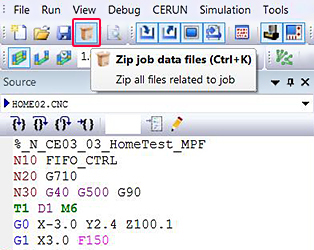
  3. Activate the icon illustrated below.

You can run the “Package Job” feature at any time during post-processing or control emulation.  When activated, this function saves the current processing state and all associated files into a compressed archive file (i.e., ZIP), suitable for e-mailing to ICAM Technical Support. The compressed archive will include the post-processor or the control emulator and machine model, the interface kit, the input CL or MCD file(s), the simulation data, as well as all the listing and log files generated to that point. A “job_info.html” file is also created, which extracts system information, ICAM environment variables, ICAM licensing information and the GENER or CE command line options.

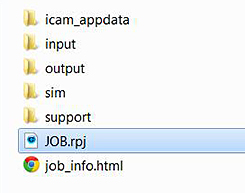
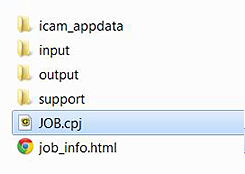
To run a packaged job, simply extract the contents of the compressed archive to a folder and run the extracted “job.cpj” or “job.rpj” file.


Benefit to User

Simplify the submission of problem reports to ICAM Technologies.

For more information or comments, please do not hesitate to contact Phil at TechTipTuesday@icam.com


CNC simulation and verification software, NC post-processing, CAM-POST, cnc post-processors, Virtual Machine, post-processor, Control Emulator, Advanced post-processor, dedicated custom post processor