CNC Machine Simulation, Verification Software CNC post-processors, CNC simulation software, cnc verification, G- code simulation verification
ICAM Technologies- CNC Simulation, advanced NC post-processing, cnc post-processor, CAM-POST, Post-processor, Virtual Machine, nc post-processing, Control Emulator, CNC postprocessors
ICAM Technologies- advanced NC post-processing, machine tool simulation, cnc post-processor, CAM-POST, post-processor, Virtual Machine, nc post-processing, Control Emulator, cnc postprocessor NC post-processor, advanced cnc Post- processors, CAM-POST, NC post-processor development, ICAM, cnc post-processor, Virtual Machine, postprocessing, machine toll simulation, Control Emulator Technical Tips from ICAM, Post processing Tutorial, CNC Tutorial, Machine Simulation, Postprocessor, G-code simulation, advanced CNC Post- processors for Mastercam Catia, NX, Creo, Mazak, DMG, Makino, HAAS, Siemens CNC Simulation, Custom Multi-axis CNC Post-processors and integrated  G-code simulation verification from ICAM
Technical Tips from ICAM, Post processing Tutorial, CNC Tutorial, Machine Simulation, Postprocessor, G-code simulation, advanced CNC Post- processors for Mastercam Catia, NX, Creo, Mazak, DMG, Makino, HAAS, Siemens
ICAM Home
Software Connecting CAD/CAM to CNC Machines
Post processors, CNC machine simulation for 5 axis machines, advanced CNC G-code simulation verification, collision detection for Mastercam, Catia, NX, Creo, Topsolid users
NC post-processor, advanced cnc Post- processors, CAM-POST, NC post-processor development, ICAM, cnc post-processor, Virtual Machine, postprocessing, machine toll simulation, Control Emulator
CNC Simulation, NC post-processor for Mastercam, advanced cnc Post- processors, CAM-POST, NC post-processor development, ICAM, cnc post-processor, Virtual Machine, postprocessing, machine simulation, Control Emulator NC post-processor, advanced cnc Post- processors, CAM-POST, NC post-processor development, ICAM, cnc post-processor, Virtual Machine, postprocessing, machine toll simulation, Control Emulator ICAM develops Custom Multi-axis NC post-processors, integrated CNC Simulation, G-code Simulation verification solutions supporting lathe, mill, advanced mill, rotary mill , mill-turns CNC Simulation, NC post-processor for Mastercam, advanced cnc Post- processors, CAM-POST, NC post-processor development, ICAM, cnc post-processor, Virtual Machine, postprocessing, machine simulation, Control Emulator NC post-processor, advanced cnc Post- processors, CAM-POST, NC post-processor development, ICAM, cnc post-processor, Virtual Machine, postprocessing, machine toll simulation, Control Emulator CNC Simulation, NC post-processor for Mastercam, advanced cnc Post- processors, CAM-POST, NC post-processor development, ICAM, cnc post-processor, Virtual Machine, postprocessing, machine simulation, Control Emulator NC post-processor, advanced cnc Post- processors, CAM-POST, NC post-processor development, ICAM, cnc post-processor, Virtual Machine, postprocessing, machine toll simulation, Control Emulator CNC Simulation, NC post-processor for Mastercam, advanced cnc Post- processors, CAM-POST, NC post-processor development, ICAM, cnc post-processor, Virtual Machine, postprocessing, machine simulation, Control Emulator

CNC Simulation, NC postprocessors from ICAM

How to ensure that CATIA uses the appropriate ICAM PPTable

The standard ICAM PPTables (inches and metric) included with the default CATIA installation may not be always up-to-date with the particular version of CAM-POST you are running.   Therefore ICAM strongly recommends replacing them with the PPTable files provided with each release of CAM-POST.

The following steps outline the procedure for updating the ICAM PPTables for CAM-POST v20.0.

    1. Copy the following two files:
    • C:\Program Files\ICAM V20\kit\CATIA\ICAM-V20-INCH.pptable
    • C:\Program Files\ICAM V20\kit\CATIA\ICAM-V20-MM.pptable

inside the “Startup\Manufacturing\PPTables” folder of your CATIA installation directory.
(example “C:\Program Files\Dassault Systemes\B22\win_b64\startup\Manufacturing\PPTables”).

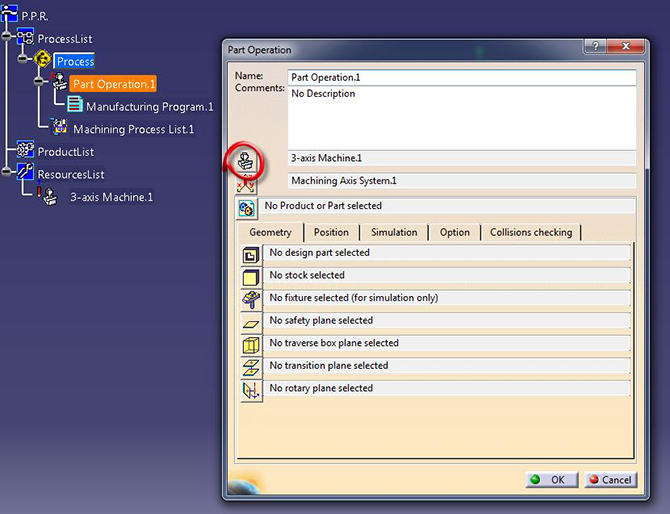
    2. To update your CATProcess, edit the Part Operation properties and click the Machine icon.
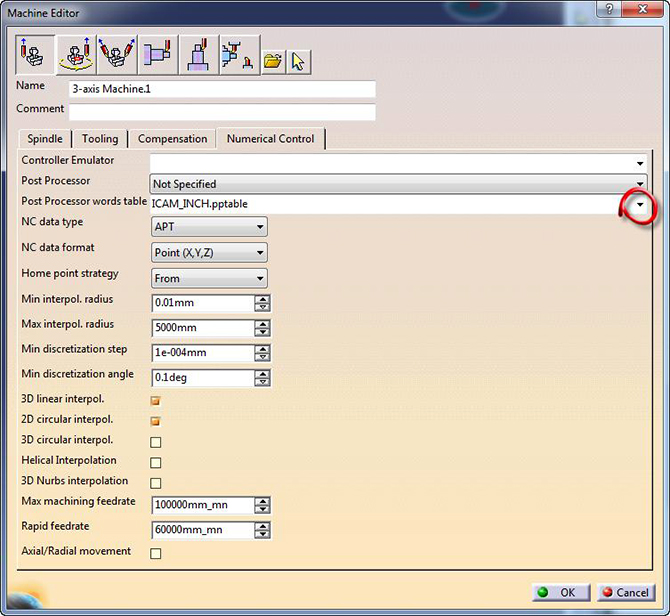
    3. In the Machine Editor dialog, select the Numerical Control tab.
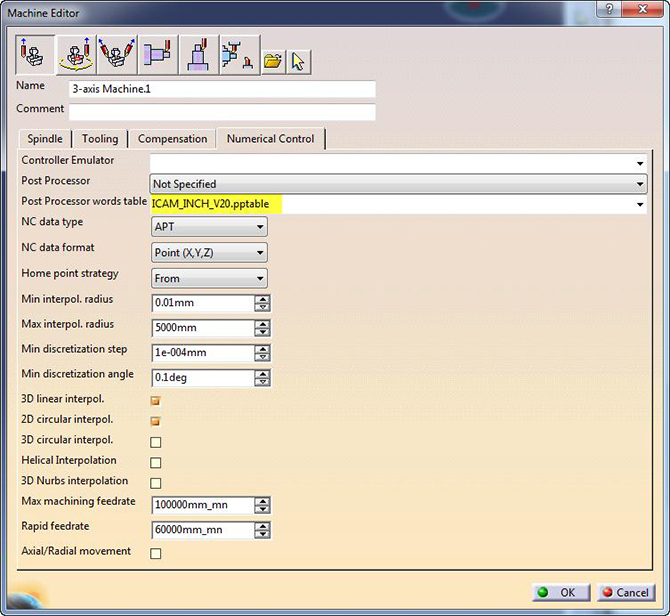
    4. Pull-down the Post Processor words table option and select either one of the two PPTables copied at step 1.

    5. Press OK to exit the Machine Editor dialog then press OK again to finish the Part Operation setup.
    6. Compute all toolpaths using the Forced computation option if required.

Benefit to User

Ensure that CATIA uses the ICAM PPTable compatible with the version of CAM-POST in use.

For more information or comments, please do not hesitate to contact Phil at TechTipTuesday@icam.com


CNC simulation and verification software, NC post-processing, CAM-POST, cnc post-processors, Virtual Machine, post-processor, Control Emulator, Advanced post-processor, dedicated custom post processor